


R & E Tinkerbells Little Boutique
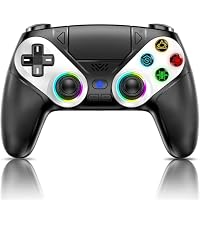
Dinosoo RGB Wireless Controller for PS5/Pro/Slim/PC, with Back Paddles, Touchpad, Dual Vibration, 6-Axis Gyro, Macro, Turbo, Speaker & 3.5mm Audio
Dinosoo RGB Wireless Controller for PS5/Pro/Slim/PC, with Back Paddles, Touchpad, Dual Vibration, 6-Axis Gyro, Macro, Turbo, Speaker & 3.5mm Audio
Regular price
£68.78 GBP
Regular price
£42.99 GBP
Sale price
£68.78 GBP
Unit price
per
Shipping calculated at checkout.
Couldn't load pickup availability
Game Controller

Controller for PS5 |

Controller for PS5 |

Controller for PS5 |
Controller for PS5 |

Controller for PS5 |

Controller for PS5 |

Controller for PS5 |
|
|---|---|---|---|---|---|---|---|
|
Customer Reviews
|
175
|
444
|
289
|
289
|
289
|
289
|
289
|
|
Price
|
£42.99 | £49.97 | — | £37.99 | £37.99 | £37.99 | £37.99 |
|
Platform Compatibility
|
PS5/PS5 Pro/Slim/PC | PS5/PS5 Pro/Slim/PC | PS5/PS5 Pro/Slim/PC | PS5/PS5 Pro/Slim/PC | PS5/PS5 Pro/Slim/PC | PS5/PS5 Pro/Slim/PC | PS5/PS5 Pro/Slim/PC |
|
Connectivity
|
Bluetooth 5.3/cable connection | Bluetooth 5.3/cable connection | Bluetooth 5.3/cable connection | Bluetooth 5.3/cable connection | Bluetooth 5.3/cable connection | Bluetooth 5.3/cable connection | Bluetooth 5.3/cable connection |
|
Trigger
|
Standard trigger | Adaptive trigger | Standard trigger | Standard trigger | Standard trigger | Standard trigger | Standard trigger |
|
Built-in audio jack
|
✔ | ✔ | ✔ | ✔ | ✔ | ✔ | ✔ |
|
Mic
|
✘ | ✔ | ✘ | ✘ | ✘ | ✘ | ✘ |
|
Hall Effect Joystick
|
✔ | ✔ | ✔ | ✔ | ✔ | ✔ | ✔ |
|
Six-Axis Motion Sensor
|
✔ | ✔ | ✔ | ✔ | ✔ | ✔ | ✔ |
|
Dual Vibration
|
✔ | ✔ | ✔ | ✔ | ✔ | ✔ | ✔ |


- Please note that if your PS-5 console is running version 14.0 or higher, you need to update the controller firmware to restore vibration and speaker functions. Upgrade address: we.tl/t-yAwofXJL9YOyyq3K Upgrade Guide: youtu.be/06jAORFjkf4 The firmware update must be performed on a Windows PC.
- 🎮【Universal Compatibility】Works perfectly with your PS5, PC, Steam, iOS, and Android (not PS4). Just connect once with the included USB-C cable, then enjoy wireless Bluetooth freedom. Press the HOME button to instantly wake your PS5.
- 🚀【Dual Vibration + 6-Axis Gyro + Audio】Dual motors let you feel every explosion and impact. The 6-axis gyro gives you motion-controlled aiming for extra precision. A built-in speaker delivers crisp in-game sounds (no microphone, though), and the 3.5mm jack lets you plug in your favorite headset – compatible with most headphones except Apple's 3.5mm models. Hear enemy footsteps and reloads clearly.
- ⚡【Turbo, Macro & Back Paddles – Pro-Level Control Made Easy】Turbo mode fires up to 10 shots per second – great for shooters and fighting games. With 16 programmable buttons, you can turn complex combos (like R2+Triangle+L3) into a single press. The back paddles keep your thumbs on the sticks at all times. These are hardcore features, but surprisingly easy to set up – get ready to dominate.
- 🌈【7 RGB Light Modes – Your Controller, Your Style】Cycle through 7 vibrant colors with three modes: steady single color, off, or a smooth 7-color breathing effect. The controller remembers your last choice, so your favorite glow is always ready. Whether you want a stealthy look or a flashy setup, this Metallic Blue controller stands out from ordinary black and white gamepads.
- ✅【After-Sales Guarantee – We're Here for You】Got a question or run into any issue? Just contact us. We'll jump in and give you a quick, helpful solution – no long waits or runarounds. Your gaming experience matters to us, and we've got your back.
- 🕹【Hall Joysticks 】Tired of wobbly sticks and drifting aim? Our Hall sensor technology eliminates drift, even after 100,000+ movements. The joysticks also feature reduced dead zones for pin-point accuracy, and the ergonomic shape fits your hands naturally. Long gaming sessions? No cramps, no frustration – just pure control.


